word salad hint system
The Word Salad Hint System: How the Clues Work
A spoiler-light guide to the Word Salad hint system: how in-game clues nudge you toward the daily theme, when to spend hints, and what the developer has and hasn't confirmed.
The Word Salad Hint System: How the Clues Work
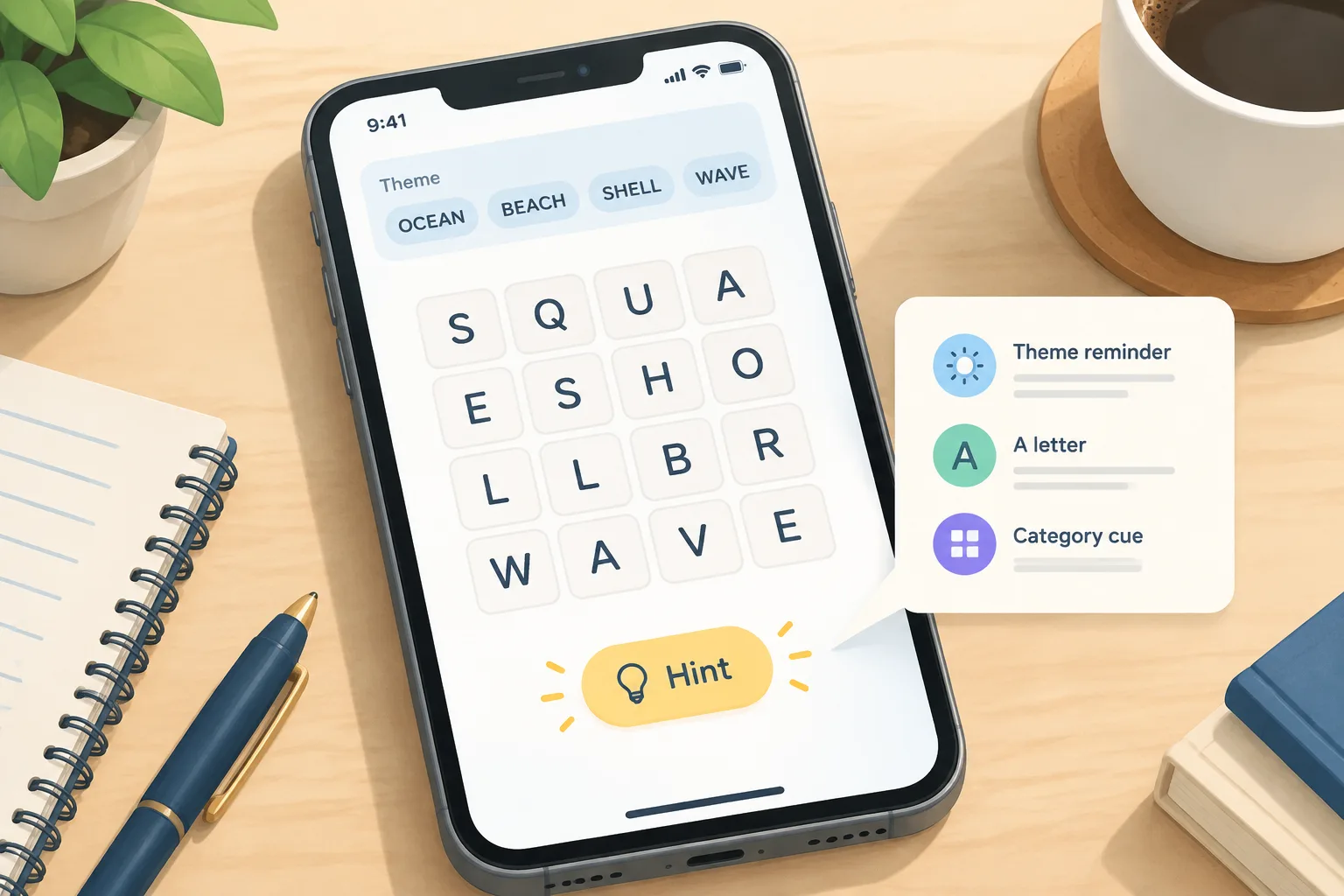
The Word Salad hint system is the built-in clue feature in the free daily word puzzle by Bleppo LTD. It gives graduated nudges — a theme reminder, a letter, or a category cue — instead of the full answer. The developer describes it as "an innovative hint system" whose clues "nod you in the right direction without ruining the fun."
This page separates what is confirmed about the hint system from what is community-observed or unverified. The exact hint economy — how many hints you get, whether they cost anything, and whether they reset — is not published by the developer, so it is marked as unverified below. Mechanics are checked against the live game; check the page footer for the latest verification stamp.
What is the Word Salad hint system?
The Word Salad hint system is an in-game help option that reveals partial information about the daily puzzle rather than the solution. Instead of handing over a word, it points you toward the theme or a specific entry so you can keep solving. The developer's App Store description frames the feature as a way to get unstuck without losing the puzzle's challenge.
Verified: the game includes a hint system, and the developer describes it as spoiler-light.
Unverified: the exact number of hints per puzzle, any cooldown, and whether hints are unlimited.
How do Word Salad hints work in a daily puzzle?
The hint system sits alongside the main swipe-to-connect letter grid. When you open a daily puzzle, the hint control lets you request a clue. The clue is designed to reduce uncertainty — not to finish the puzzle for you. In practice, that means a hint might remind you of the theme category, confirm the length of a word, or reveal a letter that helps you complete a swipe.
The key mechanic is gradual disclosure. A first hint should feel like a nudge; a later hint may feel more direct. The developer's wording — clues that "nod you in the right direction" — supports this graduated design. What a specific hint reveals on a given day can vary with the puzzle's theme and difficulty, so treat any list of clue types as a pattern, not a rule.
If you are new to the core loop, the how-to-play guide covers swiping, theme words, and puzzle numbering.
What kinds of Word Salad clues can you get?
Community players commonly describe several clue styles. These are observed patterns, not developer documentation, so they are labelled accordingly.
| Clue style | What it tends to do | Status |
|---|---|---|
| Theme nudge | Reminds you of the category family the puzzle is built around | Community-observed |
| Letter reveal | Places or confirms a letter in a word | Community-observed |
| Length cue | Confirms how many letters a target word has | Community-observed |
| Category hint | Names the broader family (for example, animals or objects) | Community-observed |
The game's own description only confirms that clues exist and that they avoid ruining the fun. Exact reveal rules are not published. That matters because two players on the same puzzle day may describe the same hint differently depending on which words they had already solved.
For theme-family background, see the basics section.
How to use Word Salad hints without spoiling the puzzle
Hints are most useful when you already have a partial read on the puzzle. The strategy below is community practice, not a developer guarantee.
Start with the theme, not the letters
If the puzzle's theme words point to a category, sit with that category before spending a hint. Theme-first thinking often solves several words at once. A hint spent before you understand the theme can reveal a letter that does not help you place the remaining words.
Spend hints on long words
Longer words carry more information per letter. If you are stuck between several short words, a hint on a five-letter entry may unlock a chain of swipes. If you are one letter away from a long word, a letter reveal can finish it immediately.
Pair hints with the letter grid
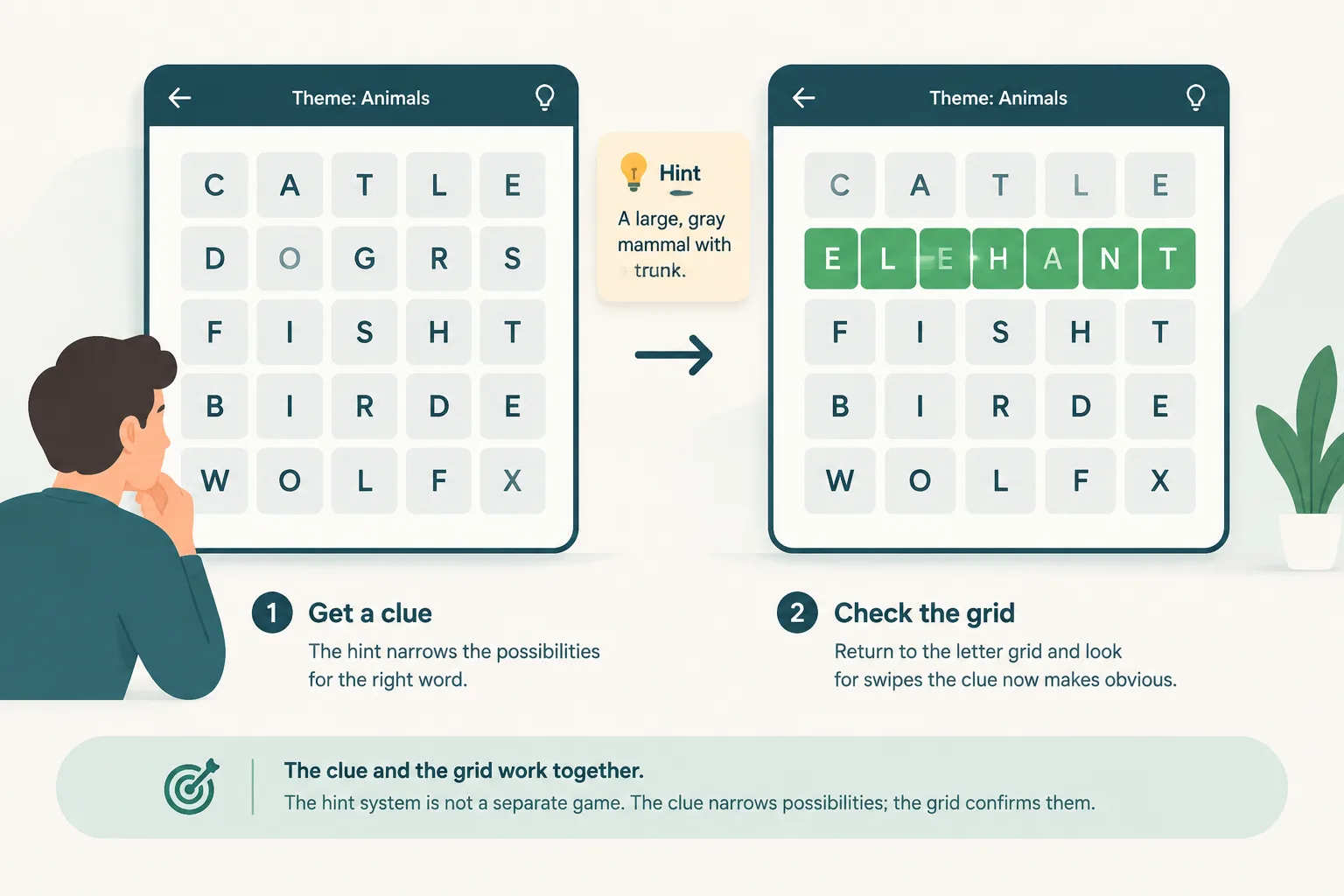
The hint system is not a separate game. After a clue, return to the grid and look for swipes that the clue now makes obvious. The clue narrows possibilities; the grid confirms them. Players who treat hints as a last step before giving up tend to get less value from them than players who use a hint to break a specific deadlock.
Are Word Salad hints free, limited, or ad-supported?
The puzzle itself is described by the developer as a free daily word puzzle. The hint system's economy is less clear. The App Store listing confirms the feature exists but does not publish a fixed number of hints per day. Community reports vary: some players describe hints as readily available, while others describe a limit or a wait. Because the developer has not documented exact costs or caps, we do not state them here.
Treat any claim like "you get three hints" or "hints cost coins" as unverified unless it comes from the live app or an official store listing. If the live game shows a limit, that is the source of truth for your account and platform.
Word Salad hint system across iOS, Android, and browser
Word Salad is playable on iOS, Android, and in a browser at wordsalad.online. The core daily loop is consistent across platforms: one puzzle per day, theme words, and a swipe-based grid. The hint control may appear in a different place or be labelled differently depending on the platform and app version. If you cannot find the hint option, check the puzzle screen for a help icon or a small button near the theme area before assuming the feature is missing.
Platform-specific differences in hint availability are not documented by the developer. For a walkthrough of the puzzle screen, see how to play Word Salad.
Word Salad hint FAQ
What is the Word Salad hint system?
The Word Salad hint system is the built-in clue feature in the daily puzzle. It gives graduated nudges — such as a theme reminder or a partial reveal — instead of the answer, and the developer describes it as a way to get help without ruining the fun.
Do Word Salad hints give you the answer?
No. The developer's description says clues "nod you in the right direction without ruining the fun." Hints are designed to narrow your options, not to complete the puzzle for you. A hint may confirm a letter, a length, or a theme, but the final swipe is still yours.
How many hints do you get in Word Salad?
The developer does not publish a fixed number of hints. Any specific count you see online should be treated as unverified unless it matches what the live app shows on your device. Check the hint control in the current puzzle for the most accurate picture.
When should I use a hint in Word Salad?
Use a hint when you have a specific blocker: you know the theme but cannot place a long word, or you have one uncertain letter in an otherwise clear swipe. Avoid spending a hint before you have read the theme words, because a theme-first approach often solves the puzzle without one.
Are Word Salad hints the same on iPhone, Android, and the browser?
The core loop is the same across platforms, but the hint control's placement and any limits may differ by app version. The developer does not publish a cross-platform hint comparison. If a hint behaves differently on one device, check for an update before assuming the feature changed.
Does using a hint break your Word Salad streak?
The developer does not state that hints affect streaks or statistics. If streak rules matter to you, verify them in the live app, because third-party summaries can be out of date.
Where to find spoiler-light Word Salad help
This wiki is built around graduated help. Daily answer pages lead with theme hints and partial clues before showing the full word list, so you can choose how much you want to see. If you only need a nudge, start with the answers section and stop at the hint level. If you want to study patterns across days, the archive shows how themes and difficulty have moved over time.
For the core mechanics, the basics and how-to-play pages cover the letter grid, swiping, and theme-word logic. If you are stuck on today's puzzle, the answers page is the fastest route to a spoiler-light hint set.
Ready to play? Open the official game at wordsalad.online or download Word Salad: a daily puzzle from the official app stores. This wiki is fan-made and not affiliated with Bleppo LTD.